
JoFotara integration for Jordan e-invoicing, built into your ERP
Aspirations is Jordan e-invoicing software with JoFotara integration built into the invoice engine. Enter the credentials you generate on the JoFotara portal, test the connection, and every sales invoice, credit note and POS sale is sent to the national e-invoicing system in UBL 2.1, with the returned QR code printed on it. The integration is ready and needs your own JoFotara credentials.
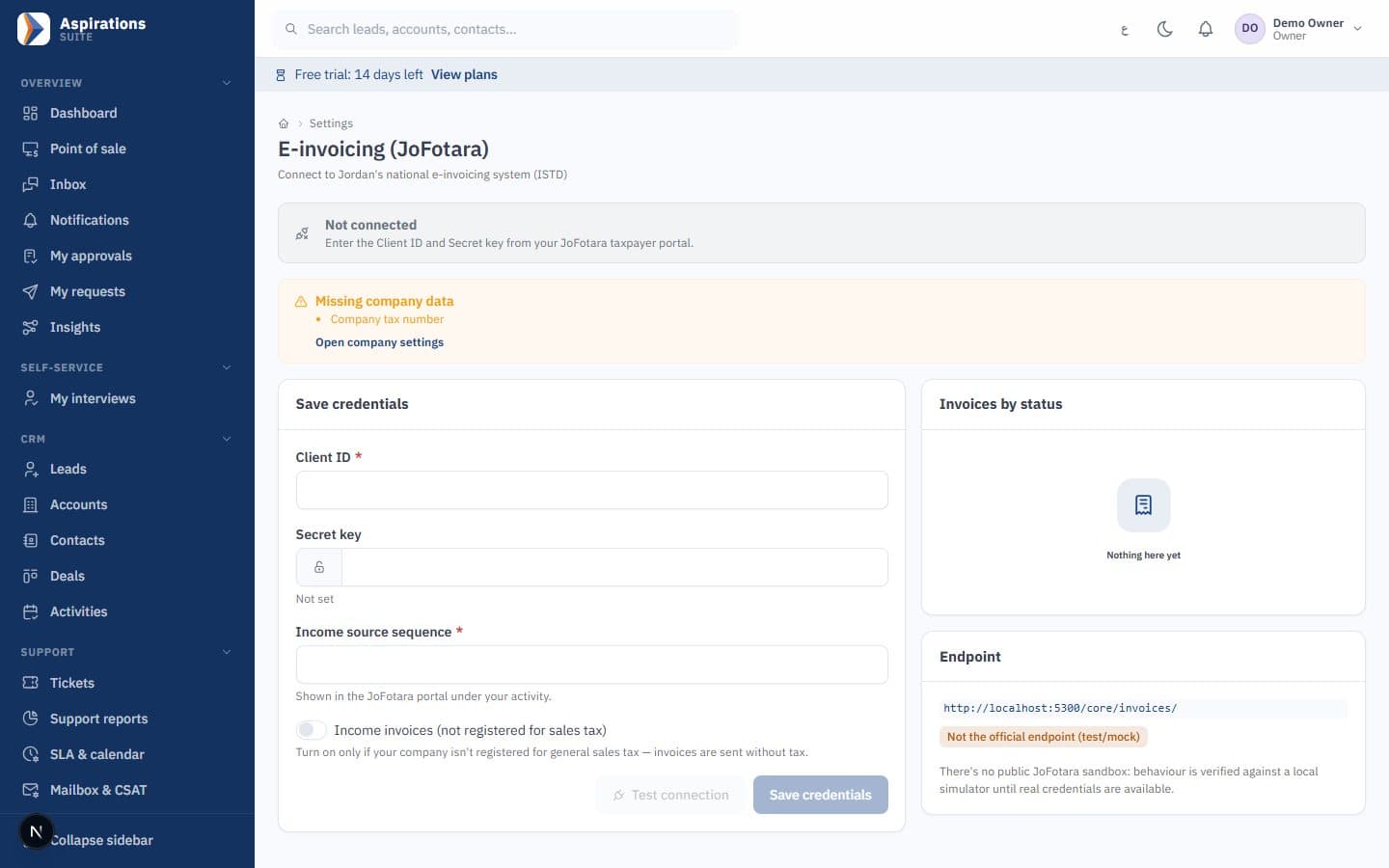
- Client ID and Secret Key from your portal, stored encrypted
- UBL 2.1 invoices with the QR code returned by JoFotara
- Credit notes linked to the original invoice and a reason
- Invoices, POS and the ledger in one system
Why e-invoicing in Jordan feels harder than it should
The rule is simple: invoices go through the national system. The daily work around it is where time is lost.
The challenge
Typing invoices twice
Sales are entered in the accounting program, then re-typed on the JoFotara portal.
With Aspirations
The invoice you issue in Aspirations is the one sent to JoFotara. No second entry.
The challenge
Rejections found too late
An invoice is rejected for a missing buyer name, and nobody notices until the customer calls.
With Aspirations
Known rejection causes are checked before the invoice takes a number, and rejections raise a notification.
The challenge
Corrections that break the books
An invoice is edited after it was sent, and the ledger, stock and portal no longer agree.
With Aspirations
Issued invoices are locked. Corrections are credit notes linked to the original.
JoFotara integration from the same invoice engine
Sales invoices, credit notes and POS sales pass through one engine that handles numbering, tax and the national system's requirements.
- UBL 2.1 as the system expects — Each invoice is built as UBL 2.1 XML and sent with your credentials in the request header, as ISTD's linking manual describes.
- Cash and receivables invoices — The invoice type follows the payment method, for sales-tax registered and income-only companies.
- QR code on every accepted invoice — The QR code JoFotara returns is stored and printed on the invoice and POS receipt.
- Tamper-evident numbering — Gap-free numbering and a hash chain expose deleted or changed invoices.
Connect your JoFotara account in a few minutes
Integration settings sit in your e-invoicing settings, and only the owner or an admin can change them.
- Client ID, Secret Key and income source sequence — Paste the values from the JoFotara portal. The secret is encrypted and never shown again.
- Test the connection — One click checks that JoFotara accepts your credentials, without creating an invoice.
- Branches with their own tax number — A separately registered branch has its own credentials and issues invoices under its own identity.
POS sales that go through the national e-invoicing system
In Jordan, a sale at the register is a cash invoice issued by the same engine, under the same JoFotara rules.
- Submitted after the sale is saved — The invoice goes to JoFotara only after the sale, stock and journal entry are committed, never for a sale that was rolled back.
- QR on the receipt — The receipt shows the QR code JoFotara returned for that sale.
- Returns as credit notes — A return at the counter becomes a credit note against the original sale.
What JoFotara requires from companies in Jordan
JoFotara is the national electronic invoicing system run by the Income and Sales Tax Department (ISTD), launched in December 2022 for companies and establishments bound by the invoicing rules. The legal basis is Article 23(f) of the Income Tax Law, which requires an original invoice for every sale of goods or services in the Kingdom, with the Regulation for Organizing and Controlling Invoicing Affairs No. 34 of 2019 and its instructions.
Invoices can be issued on the JoFotara portal, in its mobile app, or through integration (API), where your accounting or ERP system links to JoFotara and you keep working in it. Aspirations uses integration.
What a valid e-invoice needs
- Your tax number and the income source sequence linked on the portal.
- A cash or receivables invoice. According to ISTD's manual, buyer details are not required below 10,000 dinars; receivables invoices carry the buyer's name.
- Lines with quantity, price and tax category.
- UBL 2.1 XML, sent with your integration credentials.
An accepted invoice carries a QR code that buyers can scan in the government Sanad app to verify it.
Who is covered, and enforcement
ISTD has published turnover thresholds that keep some small activities, such as small licensed shops and crafts, outside the obligation. They can change, so confirm your position with ISTD or your tax adviser. The Income Tax Law treats failing to issue a proper invoice as a violation, and ISTD runs field visits: in February 2026 it notified 379 non-compliant businesses and gave them one week to correct their status. We don't quote fine amounts because they depend on the case.
How the JoFotara integration works, step by step
From the portal to an accepted invoice with a QR code.
Generate credentials on the JoFotara portal
Log in to the national invoicing system with your company's tax number, username and password. Open Connect Devices, choose New link, enter a username and pick the income source sequence. Copy the user number (Client ID) and Secret Key the portal generates.
Enter them in Aspirations
Paste the Client ID, Secret Key and income source sequence in e-invoicing settings. Tick income invoices only if you are not registered for sales tax.
Test the connection
Aspirations checks that JoFotara accepts your credentials, without creating an invoice.
Issue an invoice as usual
Before it takes a number, the invoice is checked for what JoFotara would reject: dinars only, tax number, quantities and prices above zero, buyer name where required.
Submission and QR code
The invoice is sent as UBL 2.1. Once accepted, the returned QR code is saved and printed, with any JoFotara warnings.
Handle rejections and outages
A rejected invoice shows JoFotara's error and notifies your accountants and the invoice owner. If JoFotara is unreachable, the invoice stays pending and you resubmit it with one click.
Correct with a credit note
To change an accepted invoice, issue a credit note with a reason. It references the original and is sent the same way.
Invoices, credit notes and corrections in JoFotara
An invoice accepted by JoFotara is final and cannot be edited. The correct path is a credit note (a return invoice).
How credit notes work in Aspirations
- It is created from the original invoice, in full or for selected lines.
- A reason is required, and the original must already be accepted.
- It references the original invoice number, unique identifier and total.
- Revenue, tax and stock are reversed in the ledger automatically.
Common corrections
| Situation | What to do |
|---|---|
| Customer returned some items | Credit note for the returned lines |
| Wrong price or quantity | Full credit note, then a new correct invoice |
| Wrong customer | Full credit note, then a new invoice to the right customer |
| Invoice rejected by JoFotara | Fix the data named in the error, then resubmit |
| JoFotara was unreachable | The invoice is pending; resubmit when the service is back |
Jordan sales tax categories in your e-invoices
Every JoFotara invoice line carries a tax category. Aspirations stores three, each with an editable rate:
- Standard: the general sales tax rate of 16%.
- Zero-rated: taxable at 0%, for items in the law's schedules.
- Exempt: outside sales tax, per the exemption schedule.
You set the category on each item once, and invoices, credit notes and POS sales use it. JoFotara codes zero-rated and exempt lines differently from Saudi Arabia's ZATCA; Aspirations maps them for you. Companies not registered for sales tax switch on income invoices, and lines are sent without tax. Rates are editable, so a change in the law is a settings update. Confirm each item's category with your accountant.
Current scope: domestic invoices in Jordanian dinars. Export invoices and development-zone invoices are not supported yet.
Before you go live with JoFotara: a checklist
- Your company has joined the national invoicing system and you can log in to the portal.
- You generated a Client ID and Secret Key under Connect Devices, on the correct income source sequence.
- The tax number and address are filled in; separately registered branches have their own credentials.
- Every item has the right tax category.
- Credit customers have a name and, where available, a tax or national number.
- The connection test passed.
- Your first real invoice was accepted, its QR code scans in Sanad, and it appears on the portal. We review it with you during onboarding.
- Rejection notifications are on for the right users.
What else comes with your e-invoicing
JoFotara is one part of an ERP that keeps sales, stock and accounts together.
Automatic journal entries
Invoices, credit notes and POS sales post to the double-entry ledger as they are issued.
Branches
Per-branch numbering, users limited to their branches, and per-branch statements.
Arabic and English
Full Arabic interface and right-to-left invoices.
Move from your current system
Import customers, items and opening balances from Excel templates.
Related pages
The rest of the business on the same data.
Related guides
- Jordan e-invoicing: a step-by-step JoFotara guide
- How to get your JoFotara integration credentials (Client ID and Secret Key)
- Penalties for not complying with e-invoicing in Jordan: what the law actually says
- Credit notes and returns in JoFotara: how return invoices work
- Jordan sales tax: the 16% rate, zero-rated and exempt supplies
- All guides
Questions about JoFotara and e-invoicing in Jordan
What finance teams ask before connecting.
Is JoFotara integration mandatory in Jordan?
How do I get my JoFotara integration credentials from the portal?
How do I correct an invoice that was already sent to JoFotara?
What happens if JoFotara rejects an invoice?
Can I connect the POS to JoFotara?
Is Aspirations approved by ISTD?
Issue your next invoice through JoFotara without typing it twice
Book a demo and we will walk through the settings, an invoice, a credit note and a POS sale with your data.
Request a JoFotara e-invoicing demo
Tell us your company size, branches and how you invoice today, and we will schedule a live walkthrough.